About
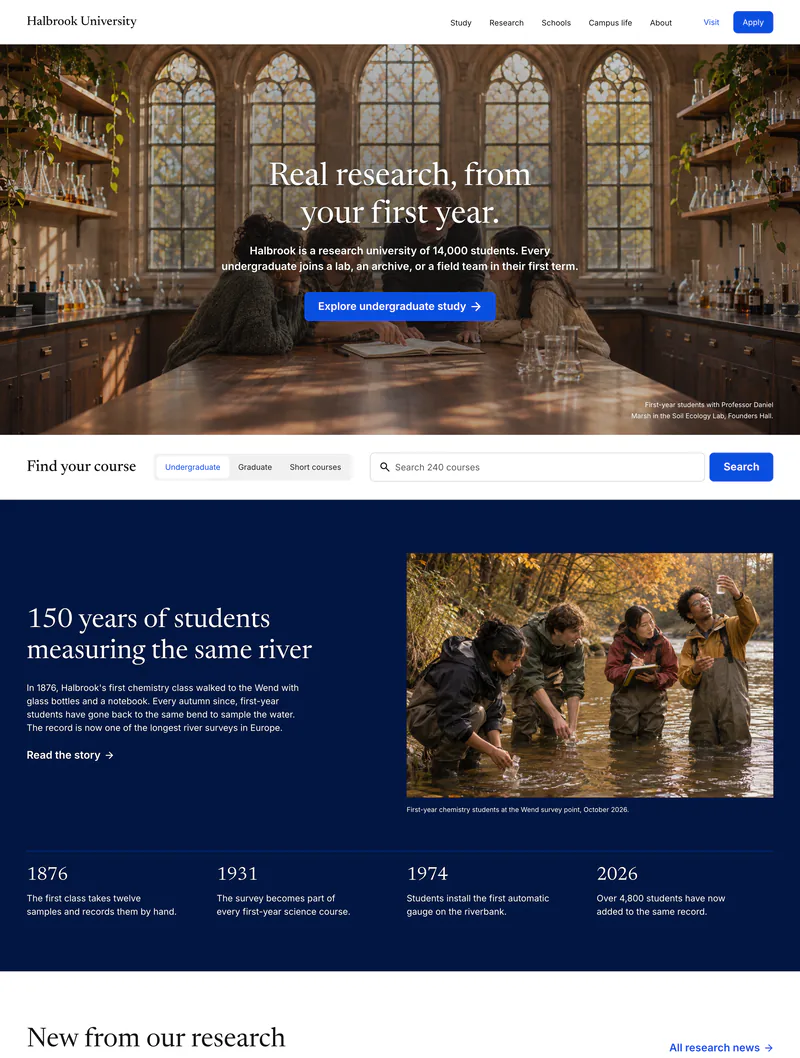
The look of today’s research universities: quiet serif headings, documentary photographs, and evidence readers can check, for a rigorous and human voice.
Make knowledge look trustworthy. Academia suits institutions whose work is their proof: every page leads with real research, real people, and sources a reader can check, so credibility comes from the work itself.
Brief first
Your agent asks how the page should open, which colors, and which type. Then it builds.
Creative purpose
A well-edited institution on screen: open space, quiet serif headings, and evidence in every section, from a finding or a figure to a date or a person at work. Credibility comes from the work itself.
Grid and composition
A 12-column grid with one shared left edge for headings, rules, and records. Findings, events, and milestones sit in ruled rows, with open space between text and photographs.
Typography
Newsreader at a regular weight for every heading and Inter for reading, captions, and controls, or your own design system typeface. Hierarchy comes from a few well-spaced sizes.
Colors
Before it builds, your agent shows your three Alpy brand colors and asks whether to keep them or use others. Your first brand color marks actions, its deepest shade fills one featured band and the footer, and the rest of the page stays calm and open.
Media
Candid, documentary photographs of people in the lab, the archive, or the seminar room, in natural light and one warm grade. Every photo carries a caption or a credit, and every claim sits with its source.
Motion
Calm and optional: the opening photo settles in, sections rise once as they come into view, and portraits zoom slightly on hover. With reduced motion on, the page is complete and still.
Responsive
The page adapts from desktop to phone in its reading order, with steady margins and headlines that read on a small screen.
Accessible
Checked for contrast, focus, and reading order.
Purposeful
Every label, number, and panel carries real content.
Best for
- Universities and colleges. Show students what studying here is like. Lead with a real moment on campus, then one way to find a course.
- Research institutes. Make findings easy to trust. Lead with a recent result and its source, then the people behind it.
- Museums, libraries, and archives. Invite people into the collection. Lead with one room or object photographed as it is, then events and opening hours.
- Scholarly publishers and learned societies. Give journals and members a credible home. Lead with the newest work and its authors, then how to submit or join.
- Foundations. Show what your funding makes possible. Lead with people doing the work, then how to apply.
FAQs
Connect Alpy MCP to your AI agent and ask it to build with the Academia skill. It asks a few questions first, then builds after you confirm.
Yes. Before it builds, your agent asks whether to use the style's colors and typefaces or the ones in your Alpy design system.
It follows the same pattern: grid, color use, type, and components. Your agent applies it to your own content, photos, and brand.
Yes. On phones every style keeps a 24 px side margin and left-aligned headlines, and the page reflows in its reading order.
Any agent connected to Alpy MCP, including Claude, Codex, Cursor, and Figma.